

By Kurian Benny · Last updated: September 6, 2026
Google reCAPTCHA Migration: What Website Owners Need to Know in 2026
Updated July 27, 2026: Google says automatic migration of reCAPTCHA Classic accounts completed in Q1 2026. Existing v2 and v3 site keys continue to work, but key management now belongs in Google Cloud.
For years, Google reCAPTCHA has helped websites reduce spam, bot submissions, fake registrations, and automated attacks.
If your website uses reCAPTCHA v2, Invisible reCAPTCHA, or reCAPTCHA v3, you may have noticed that Google is moving reCAPTCHA into the Google Cloud ecosystem.
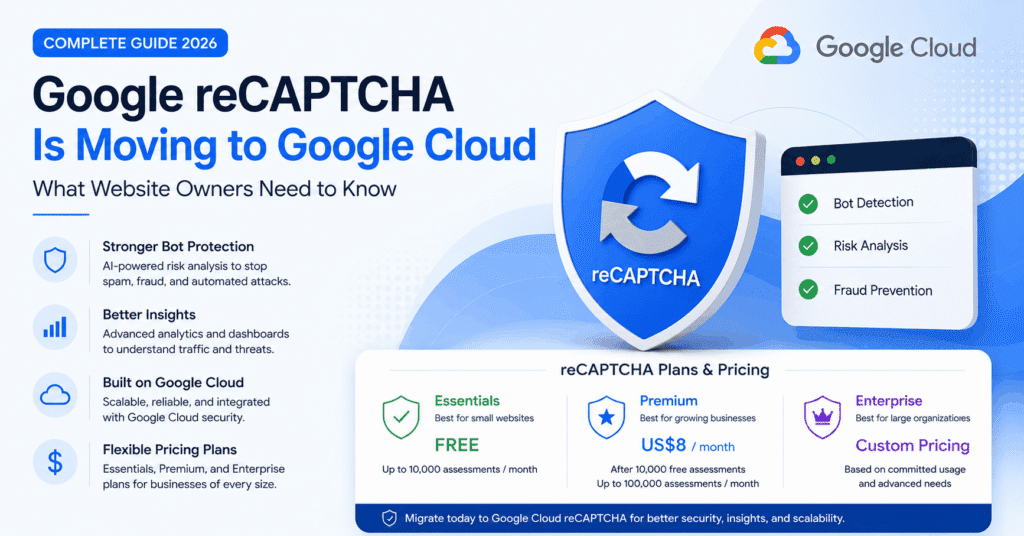
This change is not only about branding. It introduces new management options, pricing plans, enhanced security capabilities, and better visibility through Google Cloud.
For website owners, startups, SaaS platforms, eCommerce stores, and business applications, understanding Google reCAPTCHA migration is now important.
Why Is Google Changing reCAPTCHA?
Modern bots are more advanced than before. They can imitate browser behavior, test login credentials, submit fake forms, and attack websites at scale.
Google is now positioning reCAPTCHA as part of its wider Google Cloud security platform. This allows businesses to access improved bot detection, risk analysis, fraud prevention, and centralized security management.
Official Google reCAPTCHA product page:
https://cloud.google.com/security/products/recaptcha
What Is Changing?
Previously, many developers managed reCAPTCHA keys through the Classic Admin Console:
https://www.google.com/recaptcha/admin
Google now encourages users to manage reCAPTCHA through Google Cloud:
https://console.cloud.google.com/
After migrating, website owners can access better dashboards, centralized project management, usage visibility, security controls, and enterprise-level options.
Google reCAPTCHA Plans and Pricing
Google currently offers three main reCAPTCHA tiers: Essentials, Premium, and Enterprise.
| Plan | Best For | Pricing Overview |
|---|---|---|
| Essentials | Small websites, blogs, basic business sites | Free up to 10,000 assessments per month |
| Premium | Growing websites, SaaS, eCommerce, membership platforms | Free up to 10,000 assessments, then paid usage starting from US$8/month up to 100,000 assessments |
| Enterprise | Large businesses, high-traffic platforms, advanced fraud protection | Enterprise pricing based on committed usage |
Official Google pricing and product information:
https://cloud.google.com/security/products/recaptcha
Official plan comparison:
https://docs.cloud.google.com/recaptcha/docs/compare-tiers
reCAPTCHA Essentials vs Premium vs Enterprise
| Feature | Essentials | Premium | Enterprise |
|---|---|---|---|
| Basic bot protection | Yes | Yes | Yes |
| Risk analysis | Basic | Advanced | Advanced |
| Analytics dashboard | Basic | Enhanced | Full enterprise visibility |
| Fraud protection | Limited | Enhanced | Advanced |
| Suitable for high-traffic apps | Limited | Yes | Yes |
| Enterprise support | No | Limited/standard options | Yes |
Do Existing Websites Still Need to Migrate?
Google’s published timeline says automatic migration of Classic accounts completed in Q1 2026. If you did not self-migrate, Google may already have created a Cloud project and associated your existing keys with it.
Check the Google account that owned the Classic key for the project-ownership invitation. Accepting that invitation is important because existing v2 and v3 keys continue to protect the site, but you need ownership of the Cloud project to create, delete, or change those keys.
If the original key owner is no longer active and you cannot reclaim the automatically created project, Google’s guidance is to create a replacement key in a Cloud project you control and update the integration.
Official migration overview:
https://docs.cloud.google.com/recaptcha/docs/migration-overview
Will Existing reCAPTCHA Keys Stop Working?
Google says existing reCAPTCHA v2 and v3 site keys continue to work after automatic migration and do not require an immediate code change. SiteVerify requests also continue to work as before.
The operational change is in management, quota, and billing. The free allowance is 10,000 assessments per month. If an automatically migrated project exceeds that allowance without billing enabled, SiteVerify can fail open and return success:true with a score of 0.9 plus an error, while CreateAssessment requests fail closed with HTTP 429. Monitor usage and errors instead of assuming a working widget means the Cloud setup is complete.
What Website Owners Should Do Now
The migration deadline has passed, so the priority is to verify ownership and operating controls rather than plan for a future move.
- Find and accept the Google Cloud project-ownership invitation.
- Confirm that every production key appears in a project your team controls.
- Check monthly assessment volume against the 10,000-assessment free allowance.
- Enable billing or set alerts before traffic exceeds the free allowance.
- Test SiteVerify or CreateAssessment responses and alert on quota errors.
- Document a current owner so access is not tied to a former employee or agency account.
Which reCAPTCHA Plan Should You Choose?
For small websites with a contact form or simple login page, the Essentials plan may be enough if usage stays within the free monthly allowance.
For growing websites, SaaS platforms, eCommerce stores, customer portals, and membership systems, Premium may be a better option because it supports more advanced protection and larger usage.
For banks, marketplaces, high-volume applications, large SaaS platforms, and enterprise systems, Enterprise is more suitable because it provides stronger fraud protection, advanced visibility, and enterprise-grade support.
How to Verify or Complete the Google Cloud Setup
- Sign in with the Google account that owned the Classic reCAPTCHA key.
- Open the migration email or Google Cloud console and accept ownership of the automatically created project.
- Confirm that the expected site keys and allowed domains are present.
- Review IAM access and add at least one current backup owner.
- Check assessment volume, quota, billing, and budget alerts.
- Test contact forms, login, registration, password reset, and checkout flows.
- If the old project cannot be reclaimed, create a new key in a controlled project and replace the site and server credentials together.
Follow Google’s current migration documentation here:
https://docs.cloud.google.com/recaptcha/docs/migrate-recaptcha
What Website Owners Should Check During Verification
During verification, website owners should audit every place where reCAPTCHA is currently used.
- Contact forms
- Login pages
- Registration forms
- Password reset forms
- Checkout pages
- Lead generation forms
- Newsletter signup forms
- Custom application forms
This helps ensure that no important form breaks during or after migration.
Quinoid Recommendation
At Quinoid, we recommend that businesses treat this as a security and maintenance task, not just a plugin setting.
If your website or web application depends on reCAPTCHA, confirm the migrated Cloud project is under current team ownership, review the keys and monthly usage, and test every protected flow.
If you need help auditing your website security, forms, or bot protection setup, you can explore our software development services or contact our team.
Helpful Google Resources
- Google reCAPTCHA Product Page
- Compare reCAPTCHA Plans
- Migration Guide
- Migration Overview
- Google Cloud Console
Final Thoughts
Google reCAPTCHA migration is something website owners should take seriously, especially if their websites depend on forms, registrations, logins, or checkout flows.
The move to Google Cloud gives businesses better visibility, stronger security options, and more control over bot protection. But it also means website owners need to understand pricing, usage limits, and migration requirements.
Small websites may be fine with Essentials. Growing businesses should evaluate Premium. Large platforms should consider Enterprise.
The safest approach now is to confirm who owns the migrated Cloud project, verify every protected flow, monitor quota and error responses, and replace any key whose project cannot be reclaimed.
Put these ideas into practice
Discuss how this applies to your business.
Bring your question or current challenge. We can help clarify the next step.