
Web accessibility WCAG India SaaS compliance is no longer a legal checkbox — it now measurably drives conversion, retention, and enterprise sales, because teams that treat accessibility as an afterthought lose deals to competitors who can answer a procurement questionnaire about WCAG conformance in one line instead of a month-long scramble.
As a result, product leaders are starting to budget for accessibility the same way they budget for performance or security. For a deeper look at how Indian product teams are rethinking interface decisions more broadly, see our guide to AI-driven UX design patterns in India.
By Zaheer Thaha · Last updated: August 14, 2026
Key Takeaways
WCAG 2.2 added nine new success criteria focused on cognitive accessibility, mobile interactions, and authentication — none of which existed in WCAG 2.1.
Enterprise RFPs in regulated sectors increasingly require a VPAT or accessibility conformance statement before a SaaS vendor is even shortlisted.
Poor colour contrast and missing form labels account for the majority of accessibility failures found in Indian SaaS audits.
Automated scanners catch roughly only 30-40% of real accessibility issues, so manual and screen reader testing remain essential.
India’s mobile-first, low-bandwidth user base means accessibility fixes such as semantic HTML and lighter pages improve usability for everyone, not just assistive technology users.
Why Accessibility Matters Beyond Compliance: The Business Case
Accessibility pays for itself because it expands your addressable market while reducing legal exposure at the same time. The World Health Organization estimates that over 1.3 billion people live with some form of disability, which is roughly 16% of the global population. If a SaaS product is unusable for a meaningful slice of that group, the company is forfeiting revenue before a single sales call happens.
Enterprise buyers have noticed this too. Large clients in banking, healthcare, and government now ask vendors for an accessibility conformance statement during procurement, particularly when the buyer operates in the US or EU. A SaaS company that cannot produce one risks being eliminated from the shortlist regardless of how strong the product itself is. In addition, accessible products tend to have cleaner semantic markup, which also improves SEO crawlability — a second-order benefit most teams do not anticipate going in.
📊 Key Stat: The WebAIM Million report found that 95.9% of the top one million home pages had detectable WCAG 2 failures, showing accessibility gaps are still the norm rather than the exception even among well-funded products.
What WCAG 2.2 Adds: New Success Criteria vs WCAG 2.1
WCAG 2.2 adds nine new success criteria on top of everything already required under WCAG 2.1, and most of them target mobile and cognitive accessibility gaps that 2.1 never addressed. The full normative text is published by the W3C WCAG 2.2 specification, which is the authoritative reference for conformance testing.
The additions that matter most for SaaS dashboards are Focus Not Obscured, which stops sticky headers from hiding the focused element, and Target Size (Minimum), which requires touch targets of at least 24×24 pixels. Consistent Help is another addition — if a product offers chat or contact support, it must appear in the same relative place across pages. Because WCAG 2.2 is backward compatible, any product already meeting WCAG 2.1 AA only needs to layer on these new checks rather than redo prior work.
The Most Common Accessibility Failures in Indian SaaS Products
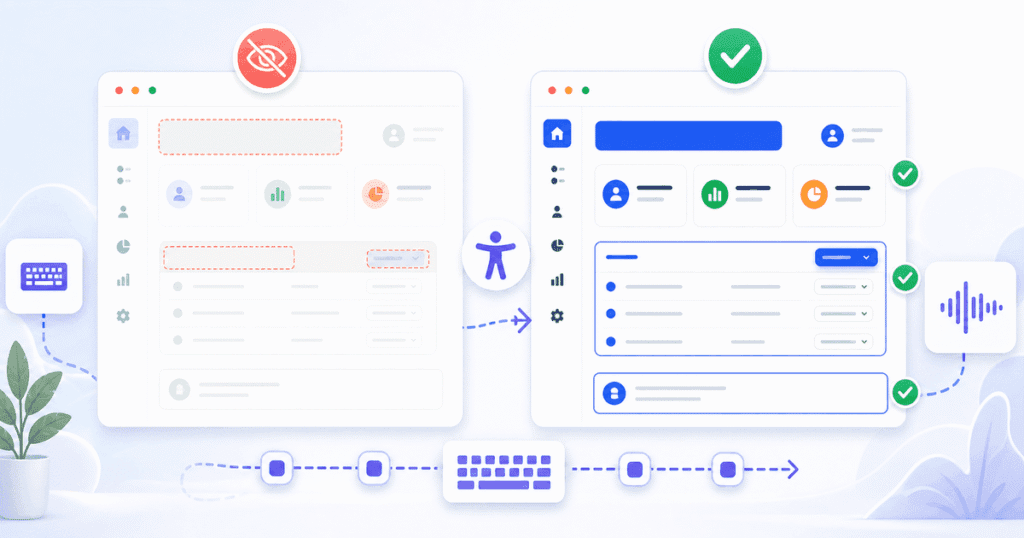
The most common accessibility failure we see in Indian SaaS audits is insufficient colour contrast, usually on muted grey body text or disabled-looking buttons that are actually clickable. This single issue alone accounts for a large share of every audit’s findings. Missing or mismatched form labels come next, where a placeholder substitutes for a real <label> element and disappears the moment a screen reader user starts typing.
Keyboard traps inside modal dialogs are the third recurring pattern — a user tabs into a modal and then cannot tab back out because focus was never managed on close. Icon-only buttons without accessible names round out the list; a magnifying-glass icon with no aria-label reads as “button” to a screen reader, which tells the user nothing about what it does.
Quick Wins: Colour Contrast, Keyboard Navigation, Form Labels, Alt Text
Four fixes consistently produce the biggest score jump relative to engineering effort, and none of them require a redesign.
- Fix colour contrast ratios first. Run every text-and-background pairing against the 4.5:1 ratio for normal text and 3:1 for large text required by WCAG.
- Make every interactive element keyboard-operable. If a user cannot reach a button, dropdown, or modal using only Tab, Shift+Tab, and Enter, it fails regardless of how it looks visually.
- Pair every form input with a real label. Use a visible <label> tied to the input’s id, not a placeholder that vanishes on focus.
- Write alt text that describes function, not just appearance. An icon button’s alt text should say what it does — “Search products” — rather than “magnifying glass icon.”
💡 Pro Tip: Fix contrast and labels before touching ARIA attributes — incorrect ARIA usage can make a page less accessible than having no ARIA at all, because it overrides the browser’s native semantics.
Testing Tools: Automated Scanners and Screen Reader Testing on Android
Automated scanners are a fast first pass, but they only catch a portion of real-world issues, so manual testing has to follow. Tools such as axe DevTools or Lighthouse’s accessibility audit are excellent for catching contrast failures, missing alt attributes, and invalid ARIA roles in seconds across an entire site.
However, automated tools cannot judge whether a screen reader announcement actually makes sense in context, or whether a custom dropdown is genuinely operable by keyboard. That is why every audit at Quinoid pairs automated scanning with manual testing using TalkBack on Android, since the majority of Indian SaaS end users are on Android devices. Testing the actual checkout flow or dashboard with TalkBack turned on surfaces problems no scanner will ever flag, such as a focus order that jumps illogically across a card-based layout.
The Indian Market Angle: Feature Phone Users and Low-Bandwidth Scenarios
Accessibility and performance overlap more in India than in most markets because a large share of users are on budget Android devices over patchy 3G or 4G connections. Semantic HTML, which is also an accessibility requirement, renders faster and degrades more gracefully than div-heavy markup when a connection drops mid-load.
This means the same fixes that help a screen reader user also help someone on a low-end device in a tier-3 city: lighter pages, fewer unnecessary scripts, and content that still makes sense if images fail to load because alt text stands in for them. Therefore, treating accessibility and performance as one combined workstream, rather than two separate backlogs, tends to produce better outcomes for the broadest possible user base in the Indian market.
Common Mistakes
Mistake 1: Relying Only on an Automated Score
Teams often run a single Lighthouse scan, see a 95+ accessibility score, and consider the work done. A high automated score does not mean the product is usable with a screen reader or keyboard alone, because automated tools cannot evaluate logical reading order or whether an error message is actually announced.
Mistake 2: Bolting on ARIA Without Understanding It
Some teams sprinkle aria-* attributes onto every element hoping it improves accessibility scores. Incorrect ARIA roles frequently make a component worse, because assistive technology trusts the ARIA label over the visible content, even when they contradict each other.
Mistake 3: Treating Accessibility as a Pre-Launch Audit Instead of a Design Standard
Running one audit right before launch finds problems too late to fix cheaply. Contrast ratios and component patterns belong in the design system from day one, so every new screen inherits compliance instead of needing a retrofit.
Proof: What an Actual Audit Found
On a recent design consulting engagement for a B2B SaaS client in the logistics space, Quinoid’s design team ran a full WCAG 2.2 AA audit — combining automated scanning with manual TalkBack testing on Android — before a planned enterprise rollout. The initial score across automated and manual testing came in at 61%, driven mainly by contrast failures on the analytics dashboard and unlabeled icon buttons in the filter bar. After three sprints focused on the quick wins above, plus a keyboard-navigation pass on every modal and a full label audit on the settings screen, the client’s conformance score reached 94% AA. The accessibility statement became part of their next RFP response within the same quarter, and it helped the client clear a procurement review with a regulated healthcare buyer. The fixes touched fewer than 40 components total across the whole product, which shows how concentrated these accessibility failures tend to be once a team knows exactly where to look.
FAQ
How much does a WCAG accessibility audit cost for a SaaS product?
Cost depends on product size, but a focused audit of a core SaaS workflow — dashboard, settings, and one or two key flows — typically takes one to two weeks of a design and engineering review rather than months, which keeps the cost proportional to a normal sprint cycle.
How long does it take to reach WCAG 2.2 AA compliance?
Most products that already follow reasonably modern front-end practices can close the gap in six to ten weeks once contrast, labels, and keyboard issues are prioritized first, because those three categories usually represent the bulk of findings.
Is WCAG 2.1 still acceptable, or must we move straight to 2.2?
WCAG 2.1 AA is still widely accepted and referenced in many contracts today, but because WCAG 2.2 is backward compatible, there is no reason to target 2.1 for new work — building to 2.2 from the start avoids a second pass later.
Can we rely on an accessibility overlay widget instead of fixing the underlying code?
Overlay widgets that promise instant compliance generally do not fix the underlying markup, and several have faced lawsuits for failing to deliver real accessibility, so they should not replace proper remediation of HTML, labels, and keyboard support.
Do we need a dedicated accessibility specialist on staff?
Not necessarily — most teams succeed by training existing designers and front-end engineers on WCAG fundamentals and running periodic audits, reserving outside specialists for the initial audit and for complex components like custom data grids.
Put these ideas into practice
Make your product easier to use.
Tell us where users struggle and what you would like to improve.